

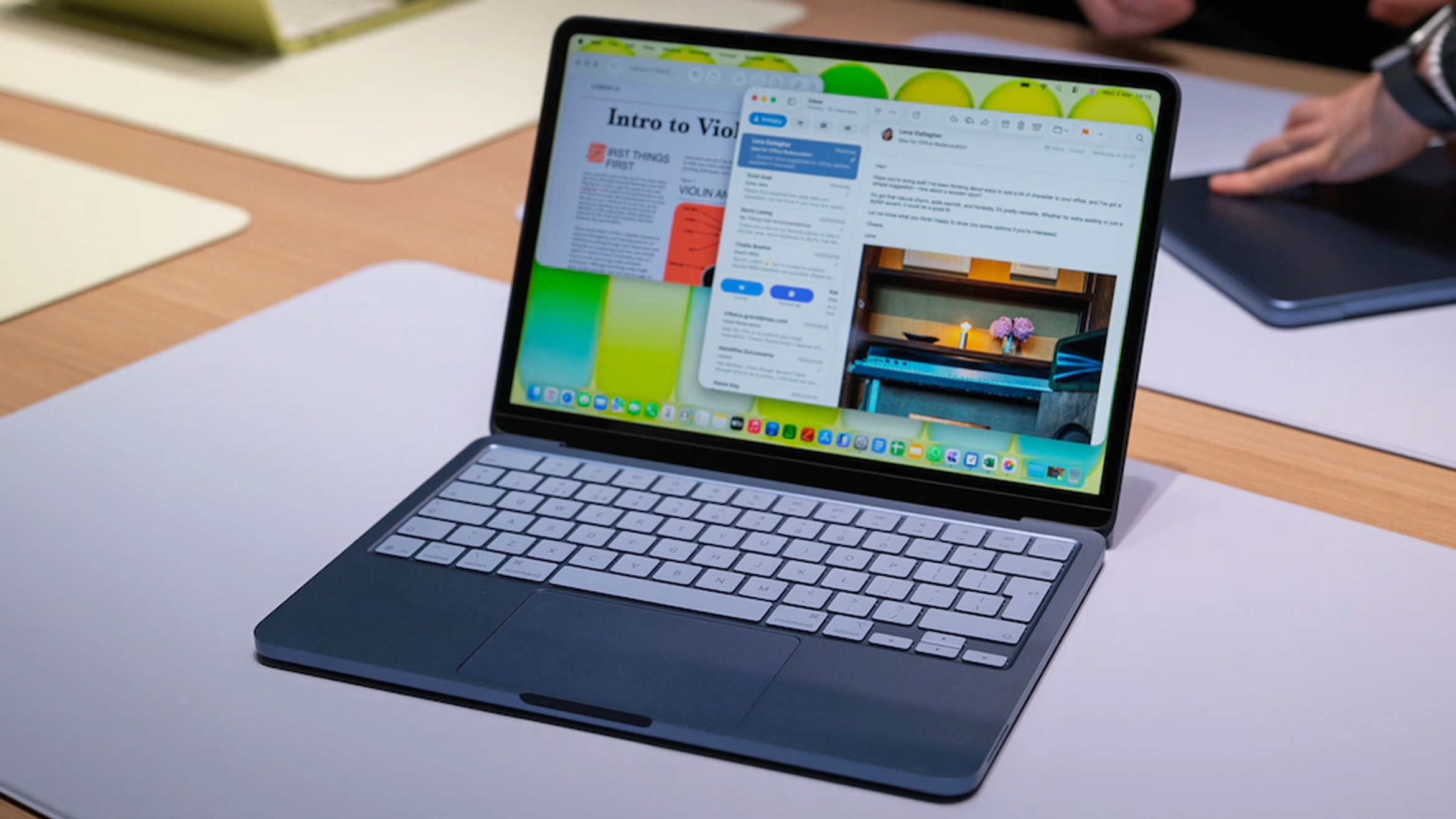
MacBook Neo — the cheapest Apple laptop with an iPhone chip and 8 GB of memory. Let's break down what kind of beast it is, who it really suits, and who it might disappoint.
MacBook Neo — this is a case where Apple simultaneously fulfilled a dream and launched a new wave of memes. On one hand, we finally got a truly affordable MacBook with current hardware and modern design. On the other — 8 GB of RAM in 2026 looks like a joke that somehow no one canceled.
Let's try to figure out what this novelty is, why it has the heart of an iPhone, and most importantly — who this laptop is made for, and who should not even approach it with 4K video editing.
What is MacBook Neo and why is there so much noise around it
Officially, MacBook Neo is positioned as the most affordable MacBook in Apple's lineup. It's a basic laptop for those who want to "enter the ecosystem" without selling a kidney on OLX.
Briefly about the hardware:
- Display: 13" Liquid Retina, resolution 2408×1506, brightness up to 500 nits.
- Processor: Apple A18 Pro — the same chip found in the iPhone 16 Pro.
- CPU: 6 cores (2 performance + 4 energy-efficient).
- GPU: 5 cores.
- Neural Engine: 16 cores for AI functions and Apple Intelligence.
- RAM: 8 GB of unified memory — and that's it, no other options.
- Storage: 256 or 512 GB SSD.
- Ports: 2×USB‑C, 3.5 mm headphone jack, separate charging port in some configurations.
- Camera: 1080p FaceTime HD.
- Wireless modules: Wi‑Fi 6E, Bluetooth 6.
- Battery life: up to 16 hours of battery life.
The price starts at approximately $599 for the 256 GB version, making Neo the cheapest MacBook on the market. Essentially, Apple said: "Here's your cheap Mac. Yes, with limitations. But cheap."
iPhone chip in a Mac body: genius or cost-cutting?
The most interesting part of the story is the processor. Instead of the traditional M series, Apple put the A18 Pro, a mobile chip from the iPhone 16 Pro, in the MacBook Neo.
What this means in practice
- In terms of overall performance, the A18 Pro is roughly on par with the M1, and in single-threaded tasks, it can even be faster.
- For everyday scenarios (browser, documents, mail, video, light editing, basic photo processing) — with a reserve for several years.
- Apple boasts that the Neo is up to 50% faster than a mainstream laptop with an Intel Core Ultra 5 in everyday tasks, and up to 3 times faster in local AI workloads.
So in theory, it's an "iPhone Pro on steroids" in the form of a laptop. In practice — a very nimble computer for all everyday tasks. If you don't plan to render a 3D hyper-realistic dragon in Blender.
AI, Neural Engine, and a bit of marketing magic
Thanks to the 16-core Neural Engine, Neo is actively geared towards online and offline AI functions and Apple Intelligence: from note summarization to background cleaning in photos. It's not a "for artificial intelligence" laptop in the data center sense, but for the user — noticeably fast and comfortable in everything related to on-device machine learning.
The irony is that we have a computer that can handle AI tasks but can simultaneously choke on 40 Chrome tabs. Because…
8 GB of RAM: It's 2026, but we're holding on
If there's a main object of jokes in the MacBook Neo, it's the 8 GB of unified memory with no option to choose more. And yes, this memory is shared between the CPU, GPU, and Neural Engine.
Why this is a problem:
- In real reviews and tests, the memory size is cited as the main limitation of Neo, especially in multitasking.
- Everything goes smoothly while you have a browser, music, messengers, and documents. Add a few heavier apps — and the system starts actively swapping data to the SSD.
- Yes, macOS works quite intelligently with memory, but the laws of physics have not been canceled yet.
On the positive side: for an undemanding user, 8 GB can still be tolerable if you don't run five Creative Cloud apps at once. But it's not about a "laptop for professional work growth" here.
Screen, body, and ports: compromises, but not a disaster
Screen
MacBook Neo received a 13-inch Liquid Retina IPS display with a resolution of 2408×1506 and brightness up to 500 nits.
- Brightness of 500 nits is very comfortable for work even in a bright office or café.
- It's not a top-level screen like the MacBook Pro: no mini-LED, high refresh rate, or advanced color spaces.
- In many reviews, it's noted that if you don't compare it closely with more expensive models, the picture is more than decent.
So for text, web, video, and basic graphics — more than okay. For professional color correction — better look at the older siblings.
Body and ports
The body is classic aluminum in new bright colors, which some reviewers found reminiscent of the good old iBook G3. Thin, light, strictly in Apple style.
As for ports, we have minimalism in action:
- 2×USB‑C, one with DisplayPort 1.4 support, the other more simplified.
- 3.5 mm headphone jack — an old good friend for introverts.
- Charging goes through USB‑C or a separate charging port, depending on the specific configuration.
No MagSafe. So the power cable, accidentally tugged by a foot, still trains your reflexes.
Who is the MacBook Neo made for
If we try to honestly answer the question "who is this novelty aimed at," it would be something like this.
Who MacBook Neo is perfect for
- Students and schoolchildren who need a laptop for notes, browser, online learning, simple projects, and a bit of entertainment.
- Office workers who live in email, spreadsheets, CRM, and video conference meetings.
- Those who want their first Mac to enter the Apple ecosystem: iCloud, Messages on the computer, AirDrop, Handoff, etc.
- Mobile users who value lightness, up to 16 hours of battery life, and modern wireless standards.
In short: it's a machine for everyday life, learning, and light content creation.
Who Neo is almost certainly not for
- Video editors, 3D designers, VFX specialists — 8 GB of memory and A18 Pro will quickly hit a wall in heavy work scenarios.
- Photographers and designers who depend on a professional-level screen and large amounts of RAM.
- Those who open 80 Chrome tabs and don't close any — the system will start actively swapping everything to the SSD, and you'll actively get nervous.
- Those who love "a reserve for 10 years" — Neo is more about "comfortable 3–5 years for undemanding tasks."
My final impressions: a budget Mac with character
MacBook Neo is both a logical step for Apple and a reason for jokes:
- Logical — because the market has long lacked an affordable MacBook with a current chip, decent battery life, and modern design.
- Funny — because 8 GB in 2026 with an active focus on AI and multimedia looks like a "demo version of a professional laptop."
If you look without emotions, Neo fits perfectly into the niche of "a laptop for most people": students, office workers, users who need a fast, autonomous, and convenient computer for daily tasks. It's like an iPhone 16 Pro with a keyboard and trackpad.
Can it be recommended? Yes, if you clearly understand your tasks and don't plan to turn it into a post-production studio. If you're one of those who install half of Adobe Creative Cloud "just in case" — better immediately look towards the MacBook Air or Pro with M-series chips and more memory.
In the end, MacBook Neo is a laptop that makes you ask the right questions: not "how powerful is it," but "how powerful a laptop do I need." And if the answer is "for the browser, mail, and a bit of AI magic" — Neo might be a very successful choice.







Comments (0)
No comments yet. Be the first to comment!
Leave a Comment